AI Operations Board
Mission Control For Every Tool & AI Agent HA5 Runs.
One screen watches every tool and every AI agent at work. When a tool falls over, it notices within 15 seconds, then retries, waiting longer each time. People and AI agents share one request board.
- Wait1 Min
- Wait5 Min
- Wait15 Min
- ✓ Back Up
AI agents read the request board, claim tasks and close them themselves.
The operator checks and steers it all from a phone. (Over a private network that links only the operator's own devices.)
How It Works
A watcher takes the pulse of every tool every 15 seconds.
If a tool falls over, it restarts it, waiting 1, then 5, then 15 minutes between tries so it never hammers a broken one.
A nightly 2:30 AM scan checks everything. Requests land on one board that people and AI agents both work from.
An air-traffic control screen for the company's software.
Document Reading
Reads Plans The Way An Estimator Does.
Custom logic for analyzing construction, engineering and architectural plans. Plans, for example, list products in technical shorthand. It reads the product schedule, pulls out the numbers that matter and finds the closest match, with tests that catch the misses.
It reads the table as printed, column by column, for free.
AI is called only if the free read finds fewer than 3 columns, 2 rows or 2 headings.
Rows join by product type mark. Equivalent products are suggested only within −15% to +25% of the specification asked for.
How It Works
It reads the product schedule exactly as it's printed on the plan, with no AI cost.
If the free read finds fewer than 3 columns, 2 rows or 2 headings, then and only then does AI take a look.
Legends and notes join by product type mark without overwriting anything already there. Then it ranks products whose specification falls within −15% to +25%.
Handing a chef's scribbled recipe to someone who returns a finished shopping list.
Product Pictures
From Any Document To A Finished Picture, In One Template.
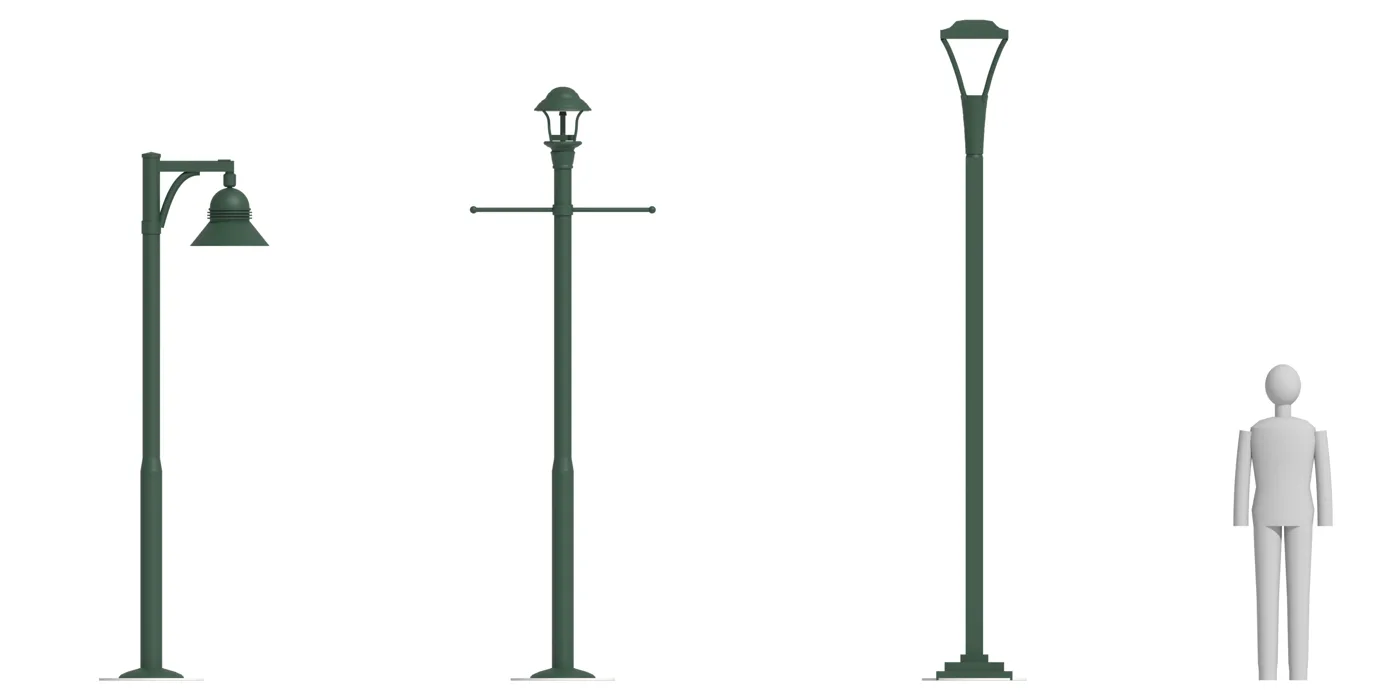
Drop in any document and a few lines of context about the scene. The system builds the picture from the real data and places it in the same ready-to-send deliverable template every time. For this client, whose customers want to see the product before they buy, it builds each item from the manufacturer's spec sheet and lights the scene with the item's real light data. AI never draws the product. Light levels on plans still come from a separate calculation program; the picture is for presentation.
BeforeClients want to see the lights before they buy, and each picture took a designer most of a day (the client's estimate, 2026).
AfterDrop in any document (a spec sheet, a drawing, a photo) and a few lines of context about the scene. The system builds the picture from the real data and places it in the same ready-to-send deliverable template every time.
Every dimension comes off the manufacturer's sheet.
The product is modeled in a 3D tool to those exact sizes.
The 3D tool uses the product's light-data file, the lab-measured map of where its light lands, for the shape of the light.
How It Works
Read the dimensions straight off the manufacturer's spec sheet.
Model the product in a 3D tool to those exact measurements.
The 3D tool shapes each product's light from its real light-data file, then one branded proposal is bound with a matching spec-sheet package. Light levels on plans still come from a separate calculation program; the picture is for presentation.
A real estate listing that stages and photographs the house for you.
Reports & Analysis
Answers Leadership Can Act On.
Were we paid correctly? Which product lines earn? Those answers were buried in raw exports. We follow every dollar from start to finish and hand back one clean report in the client's own letterhead.
How It Works
Start from the raw exports where the money questions are buried.
Follow the money end to end: distributions, manufacturer lines and the path from quote to order.
Hand back a branded PDF or workbook in the client's own letterhead.
A forensic accountant's summary that fits on a few pages.